Operating Systems · Visual Learning

See how the disk head actually moves.

An interactive simulator for the six classic disk scheduling algorithms. Enter a request queue and watch the read/write head service it step by step — on an animated platter, with the seek path plotted live and full playback controls.

6Algorithms
LiveAnimated playback
0Setup — runs in browser
Why this tool

Built to make an abstract concept click

Everything runs client-side. No install, no account — open it and start exploring.

Animated disk platter

A live SVG disk with concentric tracks and colour-coded request markers. The head arm swings to each cylinder, exactly in sync with the seek graph.

Full playback control

Play, pause, step forward and back, reset, and a speed slider from 100 ms to 2 s per move. Keyboard shortcuts included for smooth demos.

Live seek analysis

The running total seek time updates as the head moves, with a full per-move breakdown — so the cost of each decision is always visible.

Side-by-side compare

Run all six algorithms on the same request queue and compare their total seek time in a single chart. The optimal choice is highlighted for you.

Learn by doing

Concept explainers plus a hands-on tool. Perfect for OS coursework, exam prep, or teaching the elevator algorithm intuitively.

Zero dependencies

Pure HTML, CSS and JavaScript. Nothing to build, nothing to serve — just open the page in any modern browser.

The concept

What is disk scheduling?

A process needs both CPU time and I/O time. For I/O, it asks the operating system to access the disk. Many requests can arrive at once, but the disk controller can serve only one at a time — so the rest wait in a queue.

Disk scheduling is the technique the OS uses to decide the order in which these pending requests are served. Because the read/write head is mechanical and slow, choosing a good order dramatically reduces the total arm movement — and that is what these algorithms optimise.

 Try it in the simulator
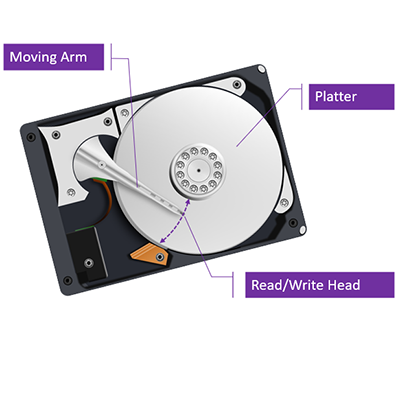
Illustration of a hard disk platter
  • Seek Time — time to move the disk arm to the track where the request will be served. This is what scheduling minimises.
  • Rotational Latency — time for the desired sector to rotate under the read/write head.
  • Transfer Time — time to actually transfer the data once positioned.
  • Disk Access Time — Seek Time + Rotational Latency + Transfer Time.
  • Disk Response Time — the average time each request waits for its I/O to complete.
Terminology

The numbers that matter

Every algorithm in this simulator is scored by total seek time — the sum of the absolute distances the head travels between consecutive requests. Lower is better.

Watch the running seek total in the simulator to feel why the order of service has such a large impact on disk performance.

The six algorithms

Every strategy, one visualizer

From the simplest queue order to the elevator-style sweeps. Pick any of them in the simulator.

FCFS

First Come First Serve

Services requests strictly in the order they arrive. Simple and fair with no starvation, but rarely the fastest.

SSTF

Shortest Seek Time First

Always jumps to the closest pending request, regardless of direction. Cuts total seek time but can starve far requests.

SCAN

SCAN (Elevator)

Moves in one direction servicing requests to the end of the disk, then reverses — like an elevator sweeping floors.

C-SCAN

Circular SCAN

Like SCAN, but after reaching the end it jumps straight back to the start, giving more uniform waiting times.

LOOK

LOOK

Like SCAN, but only travels as far as the last request in each direction instead of the disk's physical edge.

C-LOOK

Circular LOOK

Like C-SCAN, but only goes as far as the farthest request before jumping back — avoiding wasted travel to the edge.

Ready to watch the head move?

Enter a request queue, choose an algorithm, and press play. Compare all six on the same input to find the optimal schedule.